Majorsilence.Forms — Cross-Platform WinForms for .NET
- Why?
- How it works
- Getting started
- Migrating an existing application
- Beyond the basics
- Samples
- Real-world migrations
- Project origin
- https://github.com/majorsilence/Majorsilence.Forms
- Documentation: https://forms.majorsilence.com
- Live browser demo: https://forms.majorsilence.com/gallery/
- NuGet: Majorsilence.Forms
Majorsilence.Forms is a WinForms compatibility layer for .NET. It lets you take existing Windows Forms applications — legacy or modern — and run them on Windows, macOS, Linux, and, through Avalonia or Uno Platform, on mobile and in the browser via WebAssembly. You keep the programming model you already know: Forms, controls, event handlers, and even your *.Designer.cs files.
⚠️ The project is in beta. The API is stabilizing and not every corner of WinForms is covered yet, so pin your version.
Why?
Moving a WinForms application off Windows usually means a ground-up rewrite in a different UI paradigm (XAML, MVVM, or the web). That is expensive, risky, and throws away years of working business logic and UI.
Majorsilence.Forms tries to collapse that migration:
- Reuse, don’t rewrite. The same control model and event-driven code you wrote in WinForms. No XAML, no forced MVVM.
- Cross-platform by construction. Everything is drawn with SkiaSharp and runs on a swappable host backend.
- Your team’s skills transfer. WinForms experience applies directly.
- Modern under the hood. GPU-accelerated Skia rendering, HiDPI, and current .NET (8.0 and 10.0).
How it works
Majorsilence.Forms owns the controls and the rendering. The backend only puts pixels on the screen and delivers input. That separation is what lets the same application target different hosts.
        Your app  (Forms, controls, Designer files)
            │
       Majorsilence.Forms  (controls + WinForms-compatible API, drawn with SkiaSharp)
            │
   Swappable host backend
   ├─ Avalonia   → Windows · macOS · Linux (default) · also Android · iOS · Browser
   ├─ Uno        → desktop · iOS · Android · WebAssembly
   ├─ GTK 4      → Linux-first real GTK window (gir.core)
   ├─ WinForms   → Windows-only bridge: embed in an existing WinForms app, port in steps
   └─ Headless   → offscreen rendering for tests / CI
There is also Majorsilence.Forms.Drawing.Common, a Skia-backed, cross-platform replacement for the Windows-only System.Drawing.Common (GDI+) APIs — Bitmap, Font, Pen, Brush, Region, Drawing2D, and so on — so your drawing code can migrate too. It can be used on its own, without the control layer.
Getting started
The quickest way to start is the dotnet new template.
dotnet new install Majorsilence.Forms.Templates
dotnet new majorsilenceforms
dotnet run --project MajorsilenceFormsApp
This scaffolds a shared UI library plus a desktop head running on the Avalonia backend. Mobile and browser heads can be added with switches (each requires its matching workload):
dotnet new majorsilenceforms --IncludeAndroid --IncludeWasm --IncludeiOS
From scratch
Add the core package and a backend to a project:
<PropertyGroup>
    <OutputType>WinExe</OutputType>
    <TargetFramework>net10.0</TargetFramework>
    <Nullable>enable</Nullable>
</PropertyGroup>

<ItemGroup>
    <PackageReference Include="Majorsilence.Forms" Version="26.0.33" />
    <PackageReference Include="Majorsilence.Forms.Avalonia" Version="26.0.33" />
</ItemGroup>
Then write a form the way you always have:
using Majorsilence.Forms;

public class MainForm : Form
{
    public MainForm()
    {
        Text = "Hello Majorsilence.Forms";

        var button = new Button { Text = "Click me", Left = 20, Top = 20, Width = 120 };
        button.Click += (s, e) => MessageBox.Show("Hello from every platform!");
        Controls.Add(button);
    }
}

static class Program
{
    static void Main(string[] args)
    {
        Application.Run(new MainForm());
    }
}
Custom painting works as expected too. OnPaint draws in logical units and the framework scales the canvas for HiDPI displays and phones, so ordinary WinForms drawing code comes out the right size without changes.
Migrating an existing application
Two tools help move an existing codebase over.
The majorsilence-migrate CLI
dotnet tool install -g Majorsilence.Forms.Migrator
majorsilence-migrate --help
The migrator rewrites a WinForms solution (.sln, .csproj, .vbproj, a directory, or a single file) onto Majorsilence.Forms. By default it is a deliberately textual rewriter rather than a Roslyn transform. That means it is fast — thousands of files in seconds — and, importantly, it works on code that doesn’t currently compile, which is exactly the state a half-migrated legacy solution tends to be in. Any namespace it doesn’t recognize is flagged for manual review rather than guessed at.
For the rare case where a project has its own type with the same name as a WinForms type (your own Panel next to System.Windows.Forms.Panel), there is an opt-in --engine roslyn mode that uses real symbol resolution. It is slower and needs projects that load in MSBuild, and it falls back to the text engine per project if one fails to load.
Source-level compatibility shims
When rewriting using System.Windows.Forms; isn’t an option — for example a distributed control library whose public API is typed to WinForms — Majorsilence.Forms.WinFormsShims.Compat provides a source generator that lets unmodified WinForms source, including Designer.cs files, compile against Majorsilence.Forms. This is currently a proof of concept.
Port one control at a time
On Windows, the WinForms backend lets you embed Majorsilence.Forms controls inside an existing WinForms application (and vice versa), so a large application can be ported incrementally rather than in a single big-bang switch.
Real WinForms on Windows, Majorsilence.Forms everywhere else
You don’t have to drop real WinForms to go cross-platform. With MSBuild multi-targeting, one project builds a net10.0-windows target against the real System.Windows.Forms and a plain net10.0 target against Majorsilence.Forms. Windows users keep the native WinForms app they have today, and Linux and macOS users get the Majorsilence.Forms build from the same source tree.
Start with the project file. Linux and macOS can’t build a -windows target framework without extra setup, so only add it on Windows:
<Project Sdk="Microsoft.NET.Sdk">
  <PropertyGroup>
    <OutputType>WinExe</OutputType>
    <TargetFrameworks>net10.0</TargetFrameworks>
    <TargetFrameworks Condition="'$(OS)' == 'Windows_NT'">net10.0-windows;net10.0</TargetFrameworks>
    <Nullable>enable</Nullable>
  </PropertyGroup>
</Project>
Then put the switching logic in a Directory.Build.targets file next to your solution, so every project in the repository picks it up. It goes in a .targets file rather than Directory.Build.props because .props files are imported before the project body. A project with a single <TargetFramework> hasn’t set it yet at that point, so a .props file can’t branch on it. By the time .targets files are imported, $(TargetFramework) is always known.
<Project>
  <PropertyGroup Condition="'$(TargetFramework)' != ''">
    <_IsWindowsTarget Condition="$([MSBuild]::GetTargetPlatformIdentifier('$(TargetFramework)')) == 'windows'">true</_IsWindowsTarget>
  </PropertyGroup>

  <!-- net10.0-windows: the real thing -->
  <PropertyGroup Condition="'$(_IsWindowsTarget)' == 'true'">
    <UseWindowsForms>true</UseWindowsForms>
  </PropertyGroup>

  <!-- net10.0: Majorsilence.Forms -->
  <PropertyGroup Condition="'$(TargetFramework)' != '' and '$(_IsWindowsTarget)' != 'true'">
    <DefineConstants>$(DefineConstants);MAJORSILENCE_FORMS</DefineConstants>
  </PropertyGroup>

  <ItemGroup Condition="'$(TargetFramework)' != '' and '$(_IsWindowsTarget)' != 'true'">
    <PackageReference Include="Majorsilence.Forms" Version="26.0.33" />
    <PackageReference Include="Majorsilence.Forms.Avalonia" Version="26.0.33" />
    <PackageReference Include="Majorsilence.Forms.WinFormsShims.Compat" Version="26.0.33" />
  </ItemGroup>
</Project>
On the non-Windows target, the WinFormsShims.Compat source generator emits a System.Windows.Forms and System.Drawing compatibility layer backed by Majorsilence.Forms. That means your Form1.cs and Form1.Designer.cs compile unchanged against both targets, including the designer’s fully-qualified new System.Windows.Forms.Button() calls. Keep the three package versions in step. If you use central package management (Directory.Packages.props), drop the Version attributes and set the versions there.
The one place that usually needs an #if is Program.cs, because ApplicationConfiguration.Initialize() is generated by the real WinForms SDK:
using System.Windows.Forms;

static class Program
{
    [STAThread]
    static void Main()
    {
#if !MAJORSILENCE_FORMS
        ApplicationConfiguration.Initialize();
#endif
        Application.Run(new Form1());
    }
}
Pick the target framework when you build or run:
# Windows: native WinForms
dotnet run -f net10.0-windows

# Windows, Linux or macOS: Majorsilence.Forms
dotnet run -f net10.0
Developers on Windows can run both targets side by side and compare them, which is a handy way to spot rendering or behaviour differences.
Without the shims
The compat shim generator is still a proof of concept. If it doesn’t cover something your code uses, switch namespaces with the preprocessor instead. majorsilence-migrate --dual-build writes this for you at the top of each C# file:
#if MAJORSILENCE_FORMS
using Majorsilence.Forms;
#else
using System.Windows.Forms;
#endif
You can also leave the source alone and add the imports from the same Directory.Build.targets as conditional global usings. This needs <ImplicitUsings>enable</ImplicitUsings> or C# 10 or later, which SDK-style .NET projects have:
<ItemGroup Condition="'$(TargetFramework)' != '' and '$(_IsWindowsTarget)' != 'true'">
  <Using Include="Majorsilence.Forms" />
  <Using Include="Majorsilence.Forms.Drawing" />
</ItemGroup>
In this mode, remove the Majorsilence.Forms.WinFormsShims.Compat reference. UseWindowsForms already supplies the System.Windows.Forms import on the Windows target. Two caveats:
- Fully-qualified names. The preprocessor and global-using approaches only switch the imports. A fully-qualified
System.Windows.Forms.Buttonin the code itself, which is how*.Designer.csfiles are written, still points at real WinForms. Either remove the qualification or use the shims. - The
--dual-buildswitch.--dual-buildturns on Majorsilence.Forms with a singleMAJORSILENCE_FORMSMSBuild property for the whole build. The targets file above keys the same symbol to the target framework instead, so you get both builds at once instead of flipping between them.
Compatibility matrix and the stub policy
The COMPATIBILITY_MATRIX.md documents what is fully implemented, what is approximated, and what is deliberately out of scope. One consistent rule across the compatibility layer: a member without a working implementation yet no-ops or returns a sensible default instead of throwing NotImplementedException. Migrated code should compile and run. If you find a member that throws instead, that’s a bug worth filing.
There is even a Telerik UI for WinForms compatibility package (Majorsilence.Forms.Telerik) aimed at compile-and-approximate coverage for applications that depend on Telerik controls.
Beyond the basics
- Theming with CSS. Write a stylesheet and apply it to every control. The
ThemeStudiosample lets you edit a theme and watch it apply live. The same CSS can also theme real WinForms controls or native Avalonia controls. - Automation and UI testing. Run apps headlessly in CI with the Headless backend, drive them from Selenium (WebDriver) or FlaUI, expose them through Windows UI Automation for screen readers, or let an AI assistant drive them through the bundled MCP server.
- MVVM, if you want it.
Majorsilence.Forms.Mvvmis available, but entirely optional. - Native interop.
NativeControlHosthosts native content such as web views, video, and maps.WebBrowseruses realWebView2/WKWebView/WebKitGTKunder the Avalonia backend.
Samples
The repository ships a set of sample applications worth exploring:
- ControlGallery — every built-in control, running on Avalonia, Uno, GTK 4, WebAssembly, Android and iOS heads. You can try the WebAssembly version in your browser.
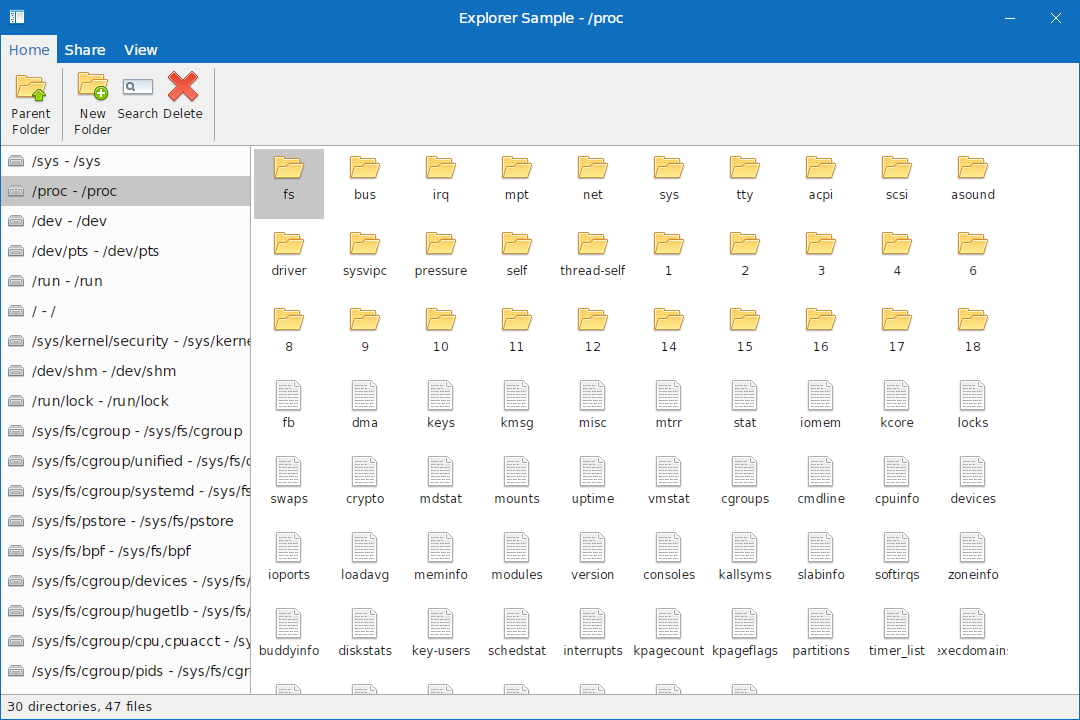
- Explorer — a Windows Explorer clone.
- Outlaw — a Microsoft Outlook clone.
- PointOfSale, ThemeStudio, WinFormsInterop, EmbeddingWinForms, EmbeddingGtk4, WinFormsCompatDemo, and AutomationTarget.
dotnet run --project samples/Gallery.Avalonia
Real-world migrations
My own projects are migrating to it, including MPlayerControl and Majorsilence Reporting. To exercise the compatibility layer and the migrator against real code, a number of open source WinForms projects have been forked and ported, including DarkUI, PKHeX, MetroFramework, RibbonWinForms, AdvancedDataGridView, and a Notepad++ clone.
Project origin
Majorsilence.Forms is a fork of Modern.Forms, re-architected with extensive AI assistance to close the WinForms API gaps, rebase the hosts on Avalonia and Uno Platform, and add WebAssembly, Android, and iOS support. AI-generated changes have been reviewed, tested, and integrated by hand. Original attribution and licensing are preserved. The project is MIT licensed.
If you have a WinForms application you would like to take cross-platform, give it a try and open an issue with anything that doesn’t work.